
File storage with paranoid-level encryption
Everything you expect from a cloud drive: folders, drag-and-drop uploads, sharing links, search. Then every file goes through the Forge and comes out sealed under three independent keys, and the third key is yours.
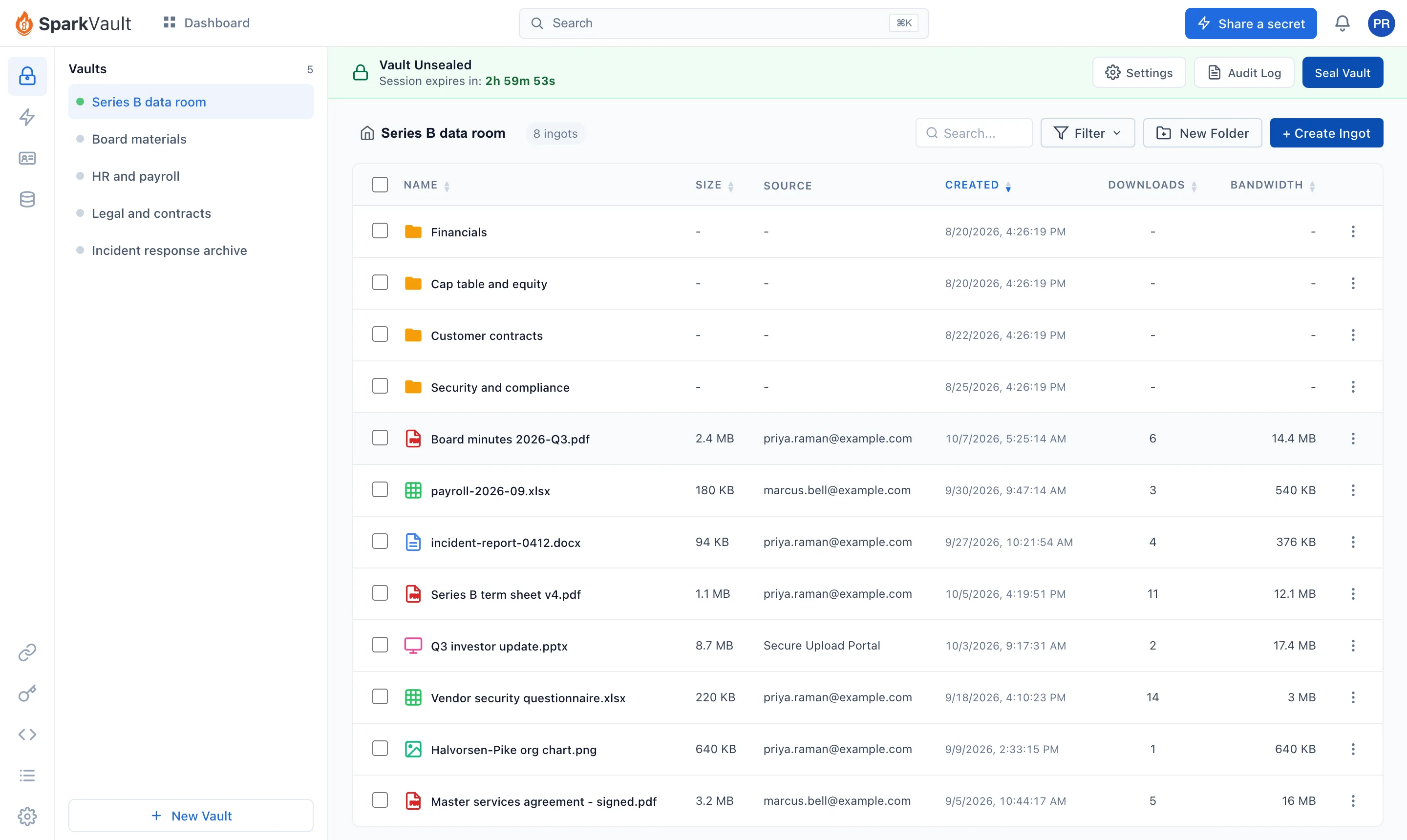
It works like the drive you already use
If your team can find a folder, they can use it. The cryptography stays out of their way.
- Any file
- From 1 byte to 5 TB each. Uploads resume after a dropped connection instead of starting over.
- Folders
- Nested up to 20 levels, with names up to 255 characters. Find a file by the start of its name.
- Sharing links
- Durable links on files.sv that are public, open to anyone who verifies their identity, or invite-only. One-time links on x.sv that work once.
- Upload portal
- A hosted page, or a drop zone in your own site, where clients and vendors can hand you files. They can add files; they cannot read anything back.
- Audit trail
- Every upload, download, sharing change and shared-link visit is logged per file, immutable, kept as long as the Vault's retention setting says.
Then every file goes through the Forge
The Forge is SparkVault's encryption and transfer service. Your browser or app sends the file over HTTPS; the Forge does the encryption on the way in and the decryption on the way out, so your code never implements a cipher.
- Your file streams in. Uploads resume after a dropped connection, from 1 byte to 5 TB.
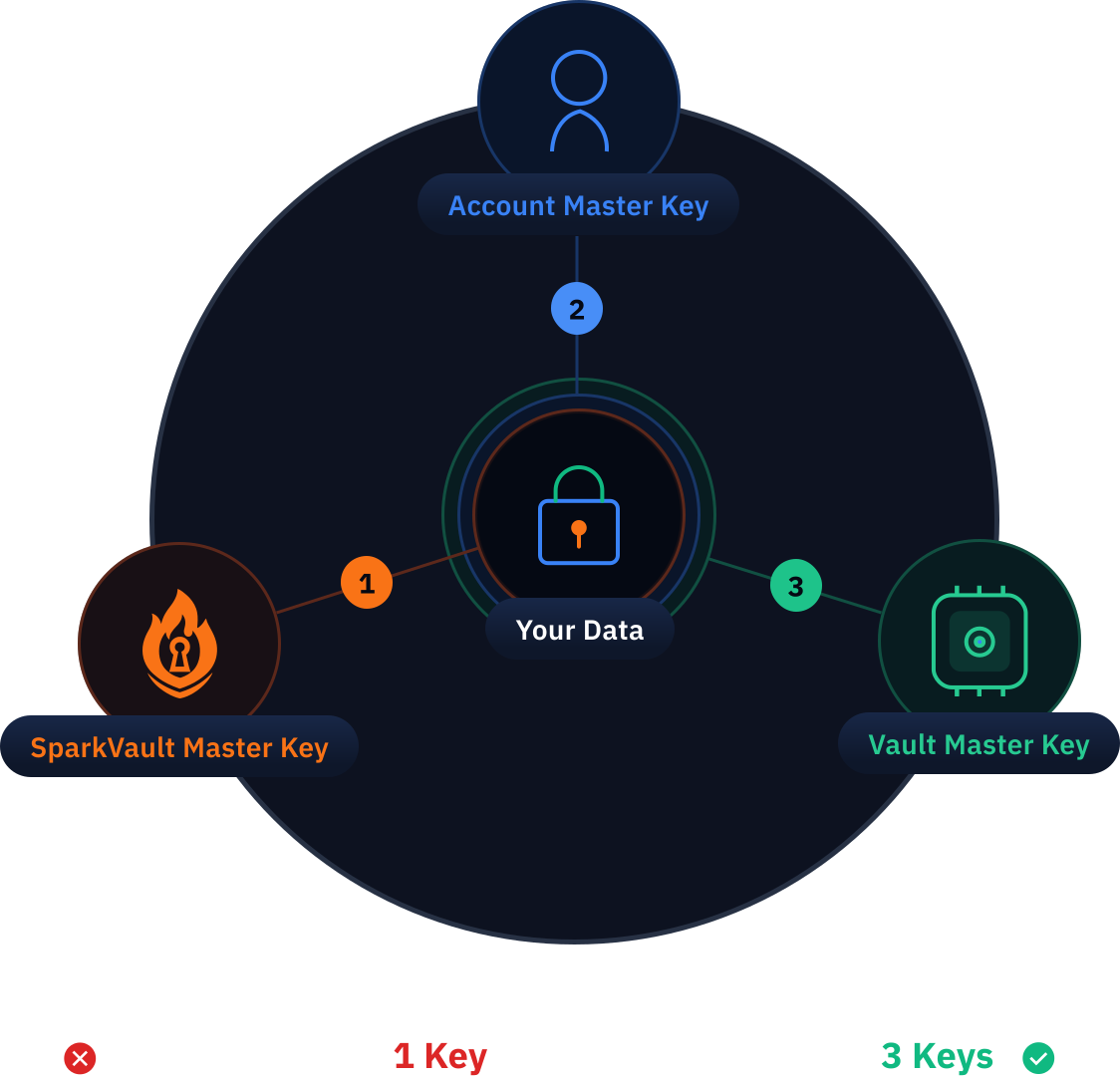
- The Forge applies all three keys. SparkVault's key, your account's key and your Vault's key combine into a per-Vault key, and each 50 MB chunk is sealed with AES-256-GCM.
- An Ingot comes out. Encrypted bytes, unreadable without the same three keys.
- It is stored in your Vault. On the way back out, the keys meet again and plaintext streams only to the client that asked.
A Vault opens with three keys, and the third one is yours
SparkVault holds one. Your account's key lives inside a FIPS 140-3 validated key management service run by a separate company. The Vault Master Key (VMK) is shown to you once, when the Vault is created.
- Self-managed VMK
- SparkVault does not store it and cannot recover it. Lose it and the Vault's contents are gone for good, which is the point.
- Hosted VMK
- The alternative: SparkVault keeps the VMK wrapped by the key management service, so features like public sharing can open the Vault on the server. Zero-knowledge applies to self-managed VMKs only.
- Unsealing
- Your VMK opens a session that lasts an hour by default and up to 24. Seal the Vault and every session ends at once.
- Delegated keys
- A Delegated Vault Access Key (DVAK) unseals the Vault in your place, for a teammate or an automation, and revoking it ends every session it opened.
- Sharing, honestly
- Turning on sharing stores a delegated key, encrypted, on SparkVault's servers so recipients can open the files you share. Turn sharing off and that key is deleted.
For records, store the fields themselves
Structured Ingots keep named fields, such as the personal data in a customer record, as encrypted key/value data with atomic updates, up to 10,000 keys per Ingot. Same Vault, same three keys.
What it costs
Per-seat pricing with no minimums. Storage and bandwidth are pooled across your whole account, and you add blocks when you need more.
Build your plan on the pricing page- Full License seat
- Read and write.
- View Only seat
- Read only.
- Storage block
- More storage, pooled across the account. The pricing page shows the live block size and price.
- Sparks
- Free on every plan. Secret sharing never costs a thing.
Create your first Vault
Sign up, create a Vault, and save the VMK it shows you somewhere you trust. Then drag your first file in.